Desktop App for Windows, macOS & Linux

Organize, analyze, and chat with your research PDFs.

Stop juggling multiple tools. LibrAIry combines smart reference management with private AI to help you draft literature reviews faster. No monthly fees. Start your free trial today.

Sound familiar?

Juggling a traditional reference manager AND a separate AI PDF tool.
Paying $15 to $25 EVERY month for cloud-based AI reading assistants.
Uploading your unpublished, confidential manuscripts to public AI servers.
Old, scanned PDFs that are completely invisible to search and analysis tools.

LibrAIry fixes this.

The Ultimate All-in-One — A robust reference manager AND an AI research assistant combined.
No Subscriptions — Pay once, use forever. A fraction of the cost of competing tools.
100% Local & Private — Run powerful AI models (Ollama) directly on your machine. Zero data leaks.
Built-in OCR — We automatically read and unlock your oldest scanned papers for full AI analysis.

How it works

From a folder of PDFs to a searchable, AI-ready collection in four steps.

1

Create a Library

Pick a folder. LibrAIry organizes everything inside — PDFs, metadata, BibTeX files.

2

Import PDFs

Select files or an entire folder. Duplicates are detected and skipped automatically.

3

Extract Metadata

One click. DOI → OpenAlex → CrossRef → AI fallback. Title, authors, year, journal, abstract — done.

4

Search, Chat, Synthesize

Multi-criteria search. Ask questions in natural language. Generate literature review sections.

Built for researchers

Every feature designed around real academic workflows.

📝

Smart Metadata Extraction

4-step pipeline: DOI detection, OpenAlex, CrossRef, then AI fallback. Free for the first three steps, near-perfect accuracy.

🔍

Multi-Criteria Search

Search by title, author, year, journal, keywords, or abstract. Combine with AND / OR / NOT operators.

🧠

AI Chat & Synthesis

Ask questions about your papers to get cited answers, or instantly generate structured literature review drafts exported directly to Word.

📄

Built-in OCR for Scanned Papers

Have older, image-only PDFs? LibrAIry automatically runs Optical Character Recognition (OCR) to extract text, identify metadata, and unlock them for full AI analysis.

📚

Automatic BibTeX

Individual .bib files for each paper plus a master library BibTeX. Export to clipboard with one right-click.

🔒

Local-First Privacy

Your PDFs and data stay on your machine. Works fully offline with Ollama. No cloud storage, ever.

Real-world extraction test

We tested LibrAIry against the industry standard using a random sample of 54 complex PDFs, including pre-2000 publications and scanned documents.

LibrAIry (with AI Fallback & built-in OCR) 48 / 54 extracted (88%)
EndNote 20+ (Traditional DOI lookup only) 20 / 54 extracted (37%)
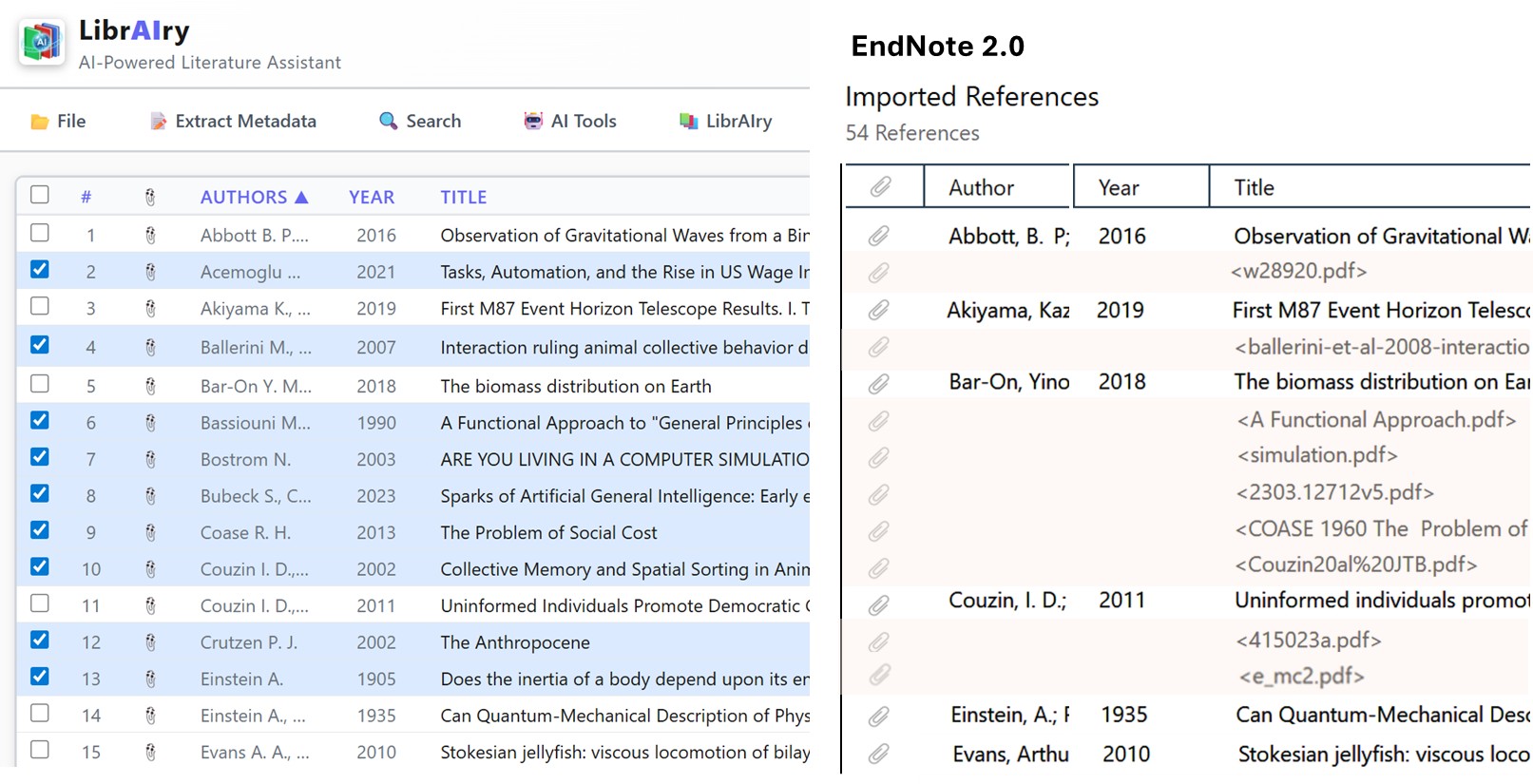
Comparison between LibrAIry and EndNote metadata extraction
Note: The blue rows in the LibrAIry table and the pink rows in the EndNote table correspond to articles for which EndNote failed to extract metadata.

Why LibrAIry outperforms traditional tools

Under the hood Traditional Managers (e.g., EndNote) LibrAIry
Extraction Pipeline Basic 2-step (PDF Metadata + First 2 pages) Robust 6-step cascading fallback (scans entire extracted text via Regex)
API Lookups CrossRef only OpenAlex (primary) → CrossRef (fallback)
False-Positive Prevention None (Often captures cited reference DOIs) Yes (Cross-validates publication year with PDF text + Jaccard title validation)
No DOI Found? Silent failure / Empty reference Title-based search fallback via CrossRef
Ultimate Fallback Manual data entry required AI Analysis (Reads raw text to extract metadata)
Scanned PDFs Silent failure Built-in Tesseract OCR → Re-extraction

Stop paying monthly subscriptions

Other AI research tools charge up to $240/year. With LibrAIry, you buy the software once and own it forever. Download the app first. If you are activating from within the app, choose your license below, complete the secure checkout, and paste your new key into LibrAIry.

Trial

$0
30 days · full features
  • All features included
  • Up to 50 articles
  • 1,000 AI Credits (~20 analyses)
  • No credit card needed
Start Free Trial
Most Popular

Personal

$50 one-time
For individual researchers
  • Unlimited articles
  • 8,000 AI Credits (~160 analyses)
  • AI Chat & Synthesis
  • Lifetime updates
Buy LibrAIry Personal

Professional

$70 one-time
Maximum flexibility
  • Everything in Personal
  • 8,000 AI Credits included
  • + Use your own Google API key
  • + Local, private AI with Ollama
Buy LibrAIry Professional

Paid licenses are perpetual. DOI / OpenAlex / CrossRef lookups are always free.
💡 What are AI Credits? 1,000 credits provide enough computing power to auto-extract metadata for ~1,000 articles, ask ~150 full-text chat questions, or generate ~50 literature reviews.
Professional license includes 8,000 AI credits plus the option to use your own Google API key or local Ollama for unlimited AI.
License keys are sent via email and can be activated directly inside the LibrAIry desktop app.
Prices exclude local taxes (e.g., VAT). Exact tax is calculated at checkout based on your country and institutional tax-exempt status.

Download LibrAIry

Get started for free. No credit card required.

🪟

Windows

Windows 10 / 11 (64-bit)
Download .exe
🍏

macOS

Apple Silicon & Intel
Coming Soon
🐧

Linux

Ubuntu, Debian, Fedora
Coming Soon

Need more AI credits?

If you are using the Personal or Professional license and run out of included AI credits, you can easily manage this directly from within the LibrAIry app. You can buy 5,000 additional AI Credits for $15 to continue using cloud AI. Professional license holders can also switch to their own Google API key or local Ollama for unlimited AI at no extra cost.

One-time purchases · Applied instantly to your existing license key

See it in action

A complete walkthrough showing you how to go from importing a folder of PDFs to drafting a literature review.

ℹ️

A note on AI and critical thinking

LibrAIry's AI features can save you considerable time by summarizing, comparing, and analyzing your articles. However, AI models can occasionally misinterpret findings, overlook nuances, or produce inaccurate statements. As a researcher, you should always read the original articles yourself and apply your own critical judgment. Think of AI as a powerful assistant that helps you work faster — not as a substitute for your expertise.